Projects
Utilities Requires: internet connection
Create and manage your team's online projects, shared across members and devices.
In the Projects Tool, you can create online projects that allow you to share device information between team members as well as create subscriptions enabling over the air updates to your projects. This is different from the local project files you open with New... or Open... — this panel is for projects shared online with your team.
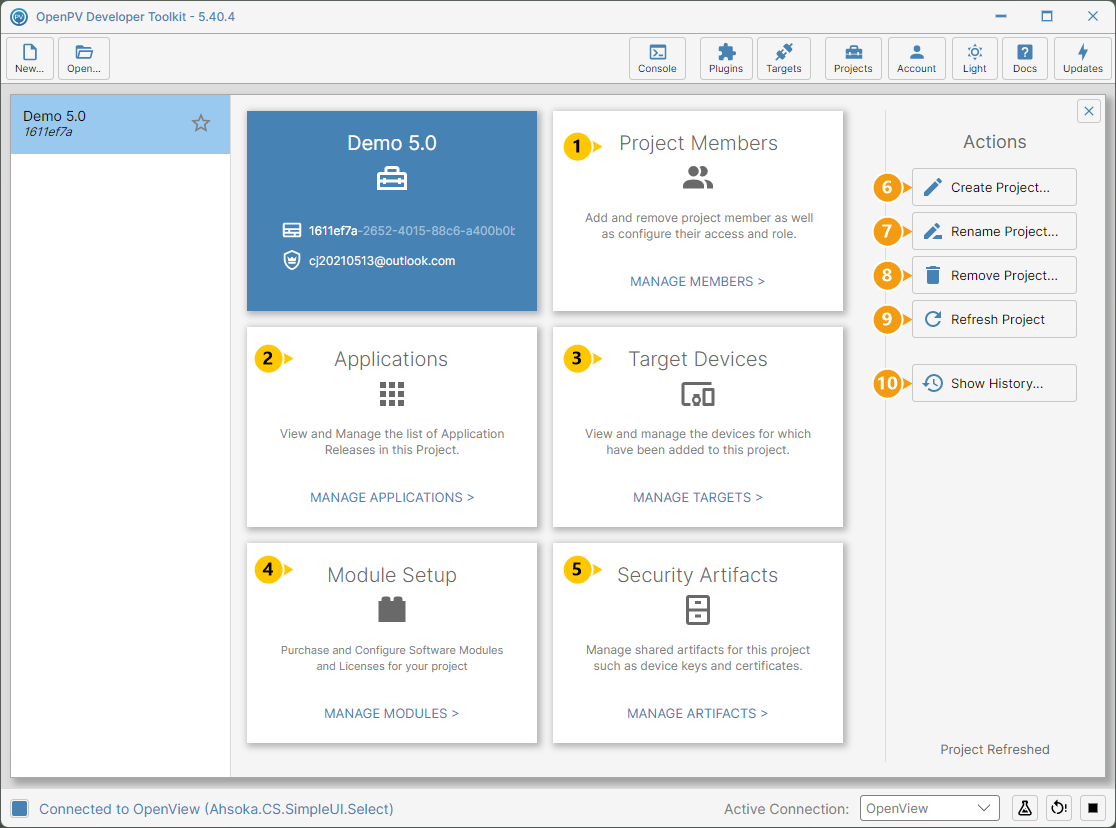
The center panel shows a card for each part of your project.
- Manage Members — add and remove project members and configure their access and role.
- Manage Applications — view and manage the list of application releases in this project.
- Manage Target Devices — view and manage the devices added to this project.
- Module Setup — purchase and configure software modules and licenses for your project.
- Security Artifacts — manage shared artifacts for this project such as device keys and certificates.
On the right, Actions offers five actions for the currently selected project.
- Create Project — create a new online project.
- Rename Project — rename the current project.
- Remove Project — delete the current project.
- Refresh Project — reload the current project's data.
- Show History — view a log of changes made to the project.
Note: Clicking Projects again while the panel is open closes it.